AI can reduce support load, speed up replies, and improve consistency. But good support automation is not just a chatbot on top of your help center.
Here is a practical way to automate customer support with AI without losing quality.
The best systems start small: they classify tickets, draft replies, find the right help article, and route issues to humans faster. Once that works reliably, you can add self-serve answers and carefully controlled actions.
Step 1: Map support categories
Start by grouping recent tickets:
- Product questions
- Billing issues
- Account access
- Bug reports
- Refunds or cancellations
- Feature requests
Automation works best when the categories and policies are clear.
Before building anything, review the last 100 to 500 support conversations. Look for patterns:
- Which questions repeat every week?
- Which issues require account access?
- Which tickets involve billing or legal risk?
- Which answers are already covered in docs?
- Which tickets are escalated because the first reply was unclear?
This gives you a realistic automation map instead of guessing from memory.
Step 2: Separate answers from actions
Some support tasks only need an answer. Others require an action.
Answers include documentation, troubleshooting, and policy explanations. Actions include refunds, plan changes, account updates, cancellations, and escalations.
Actions need stronger guardrails than answers.
Think of support automation in three levels:
| Level | What AI does | Example |
|---|---|---|
| Assist | Drafts or summarizes for an agent | "Suggest a reply for this billing question" |
| Answer | Responds to the customer from approved sources | "Here is how to reset your password" |
| Act | Changes something through a tool | "Cancel renewal after confirmation" |
Most teams should start with assist, move to answer, and only then allow action.
Step 3: Build a trusted knowledge base
Use your help center, internal SOPs, product docs, pricing pages, and support macros as source material.
Keep the knowledge base clean. AI will amplify messy, outdated, or contradictory content.
Good source material should be:
- Current
- Specific
- Written in customer-friendly language
- Tagged by product area or policy
- Clear about exceptions
- Owned by someone who can update it
If your help center says one thing and your internal support macro says another, the AI will struggle. Fix contradictions before tuning prompts.
Step 4: Add RAG and citations
Retrieval lets the AI answer from approved content. Citations help users and support agents verify the response.
The bot should say "I do not know" when sources are missing.
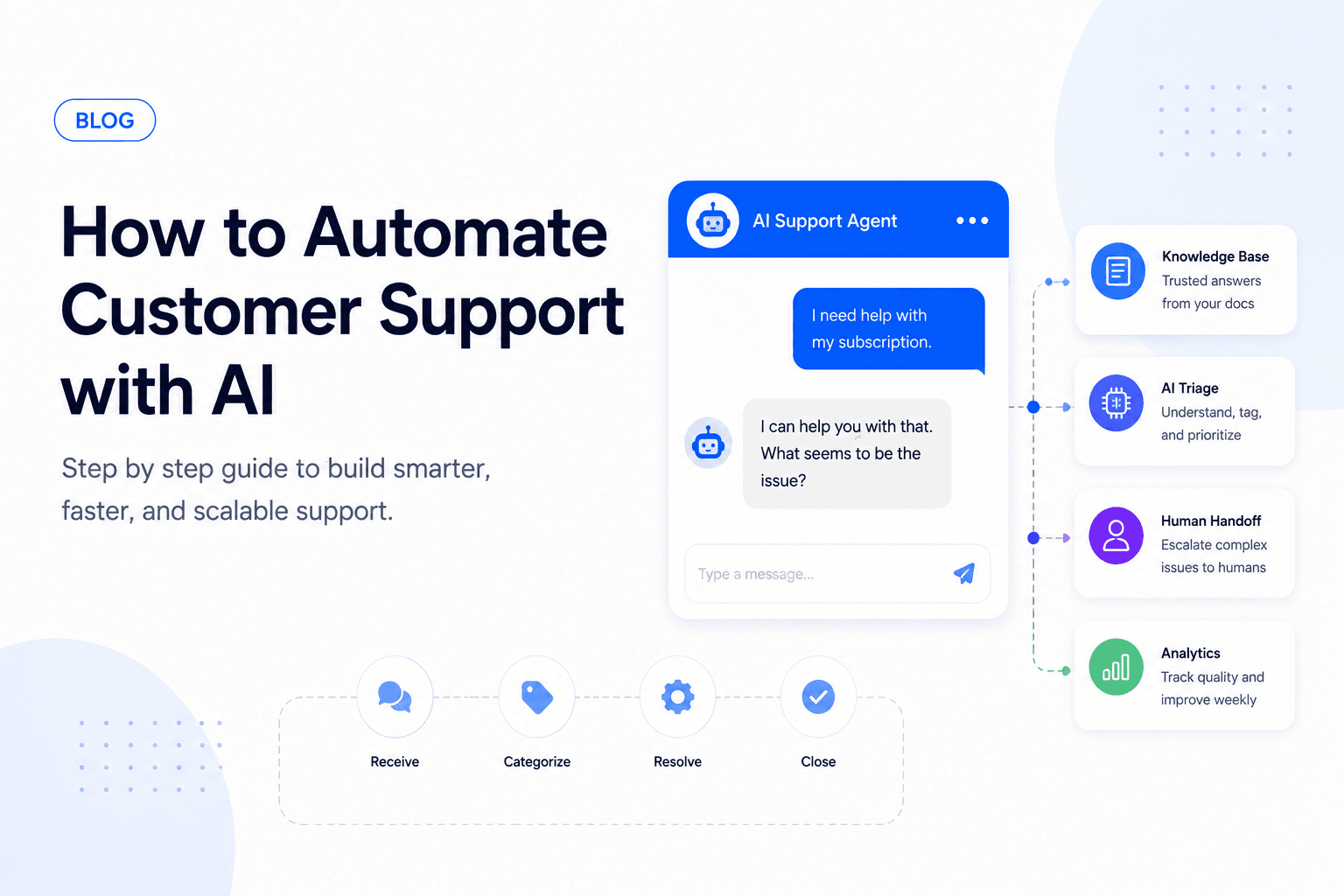
A simple support RAG flow looks like this:
- Receive the customer question
- Detect language, category, and urgency
- Retrieve relevant docs, macros, and account context
- Generate an answer grounded in those sources
- Show citations or internal source links
- Escalate if the answer is unsupported or risky
Step 5: Automate triage first
Before letting AI fully resolve tickets, use it to:
- Categorize issues
- Detect urgency
- Suggest tags
- Draft replies
- Route to the right team
This gives your support team value while reducing launch risk.
Triage automation can also enrich the ticket before a human opens it:
- Customer plan and account status
- Previous tickets
- Product area affected
- Sentiment or frustration level
- Suggested priority
- Related documentation
- Recommended owner or team
This is often the fastest win because it improves support operations without letting AI directly speak for the company yet.
Step 6: Define safe actions
Once triage and drafted replies are reliable, you can define tool-based actions. Each action should have clear inputs, permissions, and approval rules.
Lower-risk actions:
- Create a ticket
- Add tags
- Route to a team
- Send a help article
- Draft a reply
- Summarize a conversation
Higher-risk actions:
- Refund a payment
- Change a subscription
- Delete user data
- Update account ownership
- Promise a discount or credit
- Send external emails automatically
Step 7: Add human handoff
Every AI support system needs escalation. Trigger handoff when:
- The customer is angry
- The issue involves payment or legal risk
- The model confidence is low
- The user asks for a human
- The same user repeats the question
The handoff should include a short summary, not just the raw transcript. Agents should see what the customer wants, what the AI already tried, what sources were used, and why the conversation escalated.
Step 8: Measure quality weekly
Track resolution rate, escalation rate, customer satisfaction, time to first response, and hallucination reports.
Review transcripts every week and update prompts, policies, and docs based on real failures.
Important metrics:
- Time to first response
- First-contact resolution
- Deflection rate
- Escalation rate
- Customer satisfaction
- Reopen rate
- Agent acceptance rate for drafted replies
- Unsupported-answer rate
- Cost per resolved conversation
Do not optimize for deflection alone. If the bot blocks users from humans or gives shallow answers, support quality will drop even if ticket volume looks lower.
Build an eval set before launch
Create a test set from real support tickets before shipping. Include easy questions, edge cases, angry customers, billing questions, missing-doc scenarios, and tickets the AI should refuse or escalate.
Score answers with simple labels:
- Correct and grounded
- Correct but missing detail
- Unsupported by sources
- Wrong or misleading
- Correctly escalated
- Should have escalated but did not
Run this eval set whenever you change the model, prompts, retrieval settings, or help center content.
Common mistakes to avoid
Support automation usually fails for predictable reasons:
- Starting with full automation before triage
- Using outdated help docs
- Letting the AI answer billing questions without policy constraints
- Hiding human handoff
- Measuring only ticket deflection
- Skipping transcript review
- Giving the model direct access to risky actions
A practical rollout plan
Phase 1: Internal assistant
Use AI to summarize tickets, suggest tags, and draft replies for support agents.
Phase 2: Customer-facing answers
Let AI answer low-risk questions from approved docs with citations and clear escalation.
Phase 3: Workflow automation
Add tool calls for routing, ticket creation, and simple account-safe actions.
Phase 4: Controlled resolution
Allow higher-value workflows with approvals, audit logs, and quality monitoring.
Start small
The best first project is usually AI-assisted triage plus drafted replies. Once that is reliable, expand into self-serve answers and controlled actions.
If you want to automate support for your SaaS, marketplace, or service business, book a support automation call with Ownex Labs.